A schematic catalogue inside Minecraft
Browse schematics & posts, inspect them in a 3D preview, and download them straight into Litematica, without ever leaving the game.
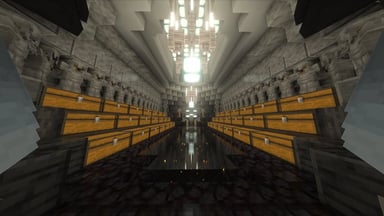
 Build of the Day
Browsing the mod
Browsing the mod to find the exact build you're looking for is simpler than ever. Use our filters, search bar & categories to find a schematic, then drop it into a collection to save it for later, or even share it on the fly to a friend using our sharing feature.
- Sort by trending, newest, most downloaded, most liked or highest rated
- A History tab, and a Following feed that notifies you when a creator you follow posts
- Right-click a card for quick actions, or download a whole collection in one go
- Downloads go straight into Litematica's schematics folder, or a folder you choose, ready to load
Inspect each build in 3D before you download it
Every post opens in a previewer. Orbit and zoom, or switch to Spectator and fly through it as if you were in the world. Cut away layers with the slider, hide close blocks while orbiting, save a PNG of the view, and read the full material list first.
Turn any image into a mapart schematic
Pick or paste an image into the mod, and simply get a schematic back for it. You can use our options for maparts to change the style, look or the complexity, and we support both flat and staircased maparts. View the material list beforehand, and use our mapart placement helper to line it up correctly before you start building.
What they are and how they work
Every player running the mod gets an icon on their nametag, you can choose to toggle this off in settings. While using the mod you can also spend Shards on our nametag cosmetics that we offer, which are gradient nametags, effects, tags and more. Visible to other players on the same server who also run the mod.
- Pick up to 18 colours to add to your collection, you can choose from your colours to create a custom gradient
- Presets are ready-made gradients, with a slight discount, and they are great if you don't know what colour theme you want
- Buy custom tags, which are displayed on your nametag. Each one is different and has an attached colour to it, add a bit of flair to your nametag!
How to earn them
Shards are the in-mod currency. Earn them through logging in daily, and spend them on cosmetics, premium schematics, and other features within the mod.
- Invite a friend. Once you both have a 3-day streak, they enter your code and you both get 100 Shards
- Quests. Earn extra Shards through completing goals and milestones
- Want Shards now? Support our small mod by purchasing a Shard pack through the Store
 How to open the mod
Just one more click away from the Index
The catalogue opens either through Litematica's own GUI menu, or you can directly open the mod with a hotkey that is changeable in the Minecraft controls.
Any downloaded schematics immediately go into your dedicated schematics folder, and are instantly ready to be used.
- Works on any server, in any world
- An Open Schematics Folder button, right next to it
- In-game notifications about downloads, new posts from creators you follow, and errors and bugs
How to install
Launch and press M
The catalogue opens from Litematica's main menu, or with its own key under Options, Controls, Schematic Index.
| Minecraft | Java | MaLiLib | Litematica |
|---|---|---|---|
| 26.2 | 25 | 0.29.3 | 0.28.4 |
| 26.1.2 | 25 | 0.28.11 | 0.27.12 |
| 1.21.11 | 21 | 0.27.16 | 0.26.12 |
FAQ
What does The Schematic Index actually do?
It puts a community schematic catalogue inside Minecraft. Browse builds in a grid, preview them in 3D, and download them straight into Litematica without leaving the game. It also turns images into mapart schematics and gives everyone running the mod a small nametag badge with cosmetics to unlock.
How do I upload my own builds?
Uploading needs an upload code so the catalogue stays curated. Join the Discord, open a support ticket and show a build you'd like to post; staff issue a code you enter once in the Upload tab. From then on you can post, edit and see stats on your schematics in game.
What are Shards and do I have to pay for anything?
No. Shards are earned for free through the daily login streak, weekly quests and inviting friends, and they're spent on nametag cosmetics and premium schematics. Browsing, previewing and downloading never cost anything, and everything you can buy with Shards can also be earned for free.
Does it work on servers, and can other players see my cosmetics?
Yes. It's a client-side mod, so it works on any server and in singleplayer. Nametag cosmetics are shown to other players who also run the mod; everyone else sees a normal nametag.
Shards, if you'd rather not wait
If you want to support us, consider purchasing something below. Remember that Shards can always be earned in game through quests and a login streak, so purchasing a Shard bundle is only if you want to support us, or you would rather not wait to earn them.
The Shards are held for this account and credited the first time it opens the mod. Until then you can cancel for a full refund. Double-check the spelling first.
Under 18? A parent or guardian should be the one paying.
Index+
Coming soonPrice to be decidedHelp support us with our purchasable rank, you can cancel anytime.
- An extra 800 Shards each month
- Daily login rewards are doubled
- All quest rewards 1.5x
- A golden "+" on your nametag, to show off to other players
- An Index+ tag while your subscription is active; early subscribers keep a Founder tag for good
Prices are shown in GBP, EUR or USD based on your location. All purchases are final once the Shards are credited. Purchases are never required, you can simply choose to speed up the process of getting Shards, or purchase something if you want to support us.
FAQ
Where can I find my Shards?
Within the mod, click the Shards button in the top right to open the Shards panel. As soon as the payment clears, your Shards will appear there. Please re-open the panel a few times before you create a support ticket in our Discord.
What can I use my Shards on?
Spend your Shards however you like on different features within the mod: premium schematics, nametag colours and gradients, colour presets, effects and tags.
Can I get a refund?
Not for a change of mind: Shards are delivered the moment payment clears and you ask for that at checkout. If your Shards did not arrive after re-opening the Shards panel a few times, or something you bought with them does not work, open a ticket in our Discord with the order id from your receipt and we will credit them, fix it or refund you.